 Tech Volt Lab Automation | PLC | SCADA | Electrical | Electronics

Related Articles

A Battery Charging Time Calculator estimates how long it will take a rechargeable battery to reach a target state of charge. Electricians, electronics engineers, solar technicians, UPS installers, maintenance professionals, automation engineers, and students can use it to calculate charging time from battery capacity, starting charge level, target charge level, charger current, efficiency, and any connected DC load. Charging time is important when selecting a battery charger, planning backup-power recovery, designing solar storage, maintaining industrial batteries, or estimating equipment availability.
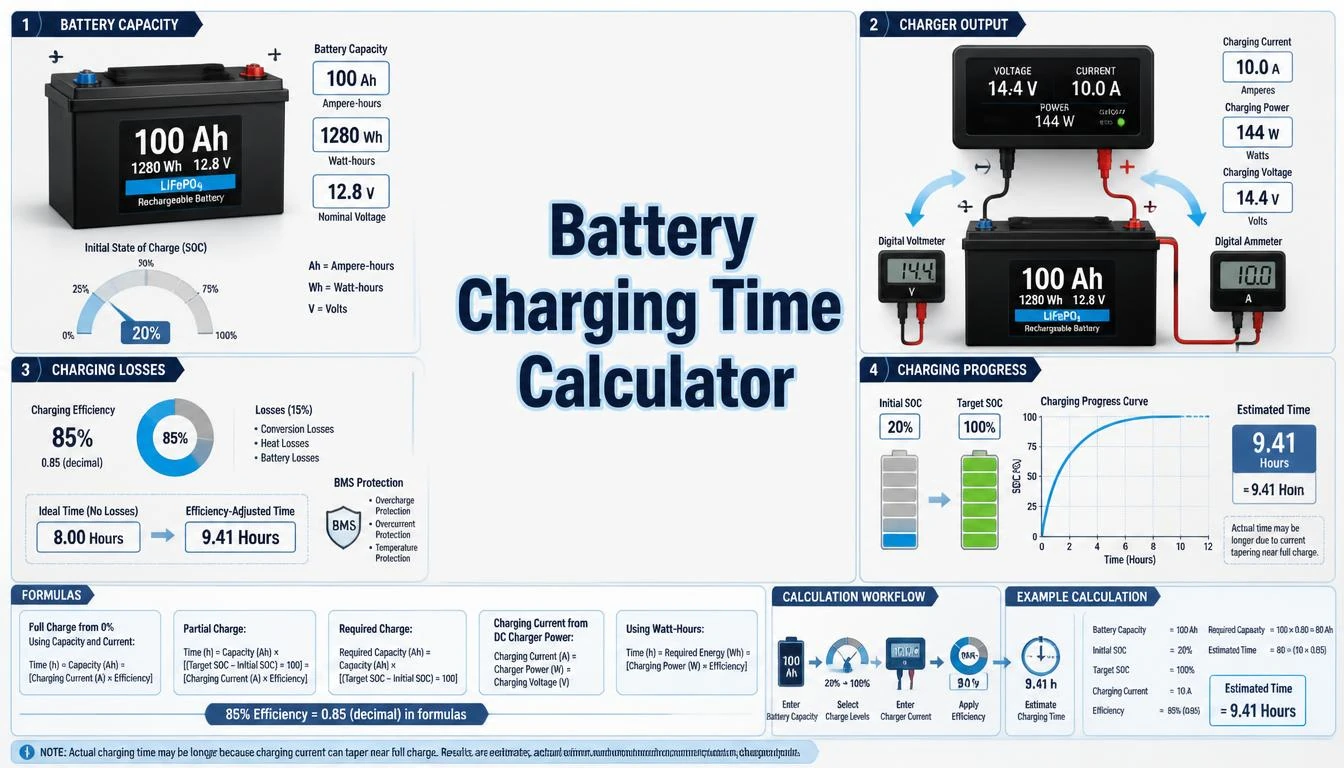
An undersized charger may require excessive recovery time, while an unsuitable charging current or voltage can reduce battery life or create a safety risk.
This guide explains amp-hour and energy-based charging formulas, state-of-charge calculations, efficiency, C-rate, connected-load effects, and the difference between ideal and practical charging time. Correct battery chemistry, capacity, charger settings, temperature limits, and manufacturer instructions remain essential for safe charging.
What Is a Battery Charging Time Calculator?
A Battery Charging Time Calculator estimates the number of hours required to replace a specified amount of charge in a battery. The basic calculation divides the required amp-hours by the effective charging current. More detailed calculations can include the starting and target state of charge, charging efficiency, charger power, battery voltage, and current consumed by equipment during charging.
Typical inputs include battery capacity in amp-hours, starting state of charge as a percentage, target state of charge, charger output current in amperes, and an efficiency factor expressed as a decimal or percentage. An energy-based calculation may instead use watt-hours or kilowatt-hours and charger power in watts or kilowatts.
The result is an estimate rather than a guaranteed completion time. Battery-management systems and chargers can reduce current because of voltage limits, temperature, cell balancing, input-power limits, or the constant-voltage finishing stage. Battery age, chemistry, internal resistance, and connected loads can also change the actual time.
How Does a Battery Charging Time Calculator Work?
The calculator first determines how much of the rated battery capacity must be replaced. A battery charged from 30% to 90% requires a 60-percentage-point increase rather than its complete rated capacity. The required amp-hours are then divided by the effective charging current.
- Select an amp-hour, energy, C-rate, or connected-load calculation.
- Enter the battery capacity and its correct unit.
- Enter the starting and target state of charge.
- Enter charger current or charger power.
- Enter a supported charging-efficiency factor where required.
- Enter any load operating from the charger or battery during charging.
- Calculate and review the estimated hours and minutes.
The result should be compared with the battery datasheet, battery-management-system limits, charger manual, temperature requirements, equipment nameplates, applicable standards, and local regulations. The calculator does not define the correct charging voltage or replace a charger designed for the battery chemistry.
Step-by-Step Process
- Identify the battery chemistry, such as flooded lead-acid, AGM, gel, LiFePO₄, or another lithium-ion type.
- Read the rated capacity from the battery nameplate or datasheet.
- Select amp-hours, watt-hours, or kilowatt-hours as the capacity unit.
- Enter the present state of charge and desired target state of charge.
- Enter the charger’s rated DC output current or charging power.
- Enter an efficiency factor supported by the selected battery and charging system.
- Subtract any continuous DC load supplied during charging, where applicable.
- Calculate and review the estimated charging time.
- Allow for current tapering, cell balancing, thermal control, and other charging stages.
- Verify charger voltage, current, and temperature settings against manufacturer information.
Battery Charging Time Calculator Formula
The basic ideal charging-time formula is:
t = C ÷ Icharge
Here, t is charging time in hours, C is the capacity to be replaced in amp-hours, and Icharge is charging current in amperes. For example, replacing 50 Ah with a constant 10 A would ideally require five hours.
This simple formula assumes constant current, no connected load, no charging loss, no current taper, and full charger output throughout the process. Real charging systems rarely maintain all these conditions until the battery reaches 100% state of charge.
Charging Time from State of Charge
Crequired = Crated × [(SOCtarget − SOCstart) ÷ 100]
t = Crequired ÷ Icharge
The state-of-charge difference must be expressed as a percentage of rated capacity. Charging a 100 Ah battery from 20% to 80% requires an estimated 60 Ah increase, not the full 100 Ah capacity.
Charging Time with an Efficiency Factor
t = Crequired ÷ (Icharge × η)
The efficiency factor η represents the assumed fraction of charging current effectively stored over the estimated period. Enter 90% as 0.90. The appropriate factor depends on battery chemistry, temperature, charging stage, battery condition, and the definition used by the manufacturer or system designer.
An efficiency factor improves a simple estimate but does not accurately model a complete multi-stage charge profile. Constant-voltage taper, absorption time, pre-charge, balancing, thermal regulation, and charger shutdown thresholds can add time independently of the selected efficiency.
Charging with a Connected Load
Inet = Icharger − Iload
t = Crequired ÷ (Inet × η)
If equipment operates while the battery is charging, part of the charger output supplies the load. Only the remaining current is available for charging. If load current equals or exceeds charger current, the battery will not charge under this simplified steady-state model.
This calculation assumes that charger and load currents remain reasonably constant. Inverters, pumps, communication equipment, PLC panels, and other intermittent loads may require a time-based energy assessment instead.
Energy-Based Charging Time
Erequired = Erated × [(SOCtarget − SOCstart) ÷ 100]
t = Erequired ÷ (Pcharge × η)
Use energy in watt-hours with charger power in watts, or use kilowatt-hours with charger power in kilowatts. Matching units produces the result in hours.
Erated ≈ Vnominal × CAh
Nominal voltage multiplied by amp-hour capacity provides an approximate nominal energy value. Actual usable energy depends on discharge rate, voltage range, temperature, battery chemistry, age, and the battery-management system.
Charging Current from C-Rate
C-rate = Icharge ÷ Crated
Icharge = C-rate × Crated
For a 100 Ah battery, a charge rate of 0.2C represents 20 A, while 0.5C represents 50 A. The letter C in C-rate refers to battery capacity, not capacitance. Never assume that a particular C-rate is acceptable for every battery. Use the maximum and recommended charging currents stated by the manufacturer.
Formula Explanation
| Symbol | Description |
|---|---|
| t | Estimated charging time in hours (h) |
| C | Battery capacity or charge to be replaced in amp-hours (Ah) |
| Crated | Rated battery capacity in amp-hours (Ah) |
| Crequired | Estimated capacity to be replaced in amp-hours (Ah) |
| Icharge | Battery charging current in amperes (A) |
| Icharger | Total DC output current available from the charger in amperes (A) |
| Iload | Current consumed by connected equipment in amperes (A) |
| Inet | Current remaining for battery charging in amperes (A) |
| SOCstart | Estimated battery state of charge before charging (%) |
| SOCtarget | Desired battery state of charge after charging (%) |
| η | Assumed charging-efficiency factor entered as a decimal |
| Erated | Nominal rated battery energy in Wh or kWh |
| Erequired | Energy required to reach the target SOC in Wh or kWh |
| Pcharge | Charging power delivered toward the battery in W or kW |
| Vnominal | Nominal battery voltage in volts (V) |
| CAh | Battery capacity in amp-hours (Ah) |
| C-rate | Charging current divided by rated amp-hour capacity |
Interactive Battery Charging Time Calculator
Use the calculator below to enter the required values and obtain the calculated engineering result.
Estimate battery charging time using capacity, state of charge, charger current, and efficiency. Enter values and press Calculate.⚡ Battery Charging Time Calculator
Battery Charging Time Result
Required Ah = capacity × (1 − SOC)
Time = required Ah ÷ (charger current × efficiency)
Example 1 – Charge a Battery from 20% to 100%
A 100 Ah battery is at 20% state of charge and must be charged to 100%. The charger supplies 20 A, and an efficiency factor of 0.90 is used for the estimate.
Required capacity: 100 × [(100 − 20) ÷ 100] = 80 Ah
Effective charging current: 20 × 0.90 = 18 A
Charging time: 80 ÷ 18 = 4.44 hours
Final result: Approximately 4 hours and 27 minutes
The calculated value is an estimate. Charging to 100% may take longer because the charger can reduce current during absorption, constant-voltage operation, balancing, or temperature control.
Example 2 – Estimate Lead-Acid Charging Time
A 200 Ah lead-acid battery bank is at 50% state of charge. It must reach 100% using a 30 A charger. An efficiency factor of 0.85 is used only as an estimating input.
Required capacity: 200 × [(100 − 50) ÷ 100] = 100 Ah
Effective charging current: 30 × 0.85 = 25.5 A
Charging time: 100 ÷ 25.5 = 3.92 hours
Final result: Approximately 3 hours and 55 minutes before additional finishing allowance
A lead-acid battery normally requires an absorption stage during which current decreases while voltage is regulated. The complete charge may therefore take longer than the calculated bulk-stage estimate. Use the battery manufacturer’s specified charging profile.
Example 3 – Calculate Charging Time Using C-Rate
A 60 Ah lithium battery is charged from 20% to 90% at a specified charging rate of 0.5C. An efficiency factor of 0.95 is used for this simplified example.
Charging current: 0.5 × 60 = 30 A
Required capacity: 60 × [(90 − 20) ÷ 100] = 42 Ah
Effective charging current: 30 × 0.95 = 28.5 A
Charging time: 42 ÷ 28.5 = 1.47 hours
Final result: Approximately 1 hour and 28 minutes
The result assumes that the battery and BMS permit a 0.5C charge rate throughout most of the selected SOC range. Current limiting, temperature, cell voltage, balancing, or charger input capacity can extend the actual time.
Example 4 – Charge a 200 Ah Battery from 50%
A 200 Ah battery is at 50% state of charge and is charged with a 20 A charger at 85% efficiency. Enter 200 Ah, 50%, 20 A, and 85% in the calculator.
Capacity to restore: 200 × (100 − 50) ÷ 100 = 100 Ah
Efficiency-adjusted charge: 100 ÷ 0.85 = 117.65 Ah
Charging time: 117.65 ÷ 20 = 5.88 hours
Final result: The estimated charging time is approximately 5 hours and 53 minutes.
Practical Field Considerations for Battery Charging Time
Battery charging is not always a constant-current process. Lithium-ion chargers commonly use pre-charge, constant-current, and constant-voltage stages. During constant-voltage charging, current gradually decreases until the charger or BMS reaches its termination condition. The final portion can therefore take longer than a simple Ah/current calculation suggests.
Lead-acid charging generally includes bulk, absorption, and float stages. During absorption, the charger maintains a controlled voltage while current decreases. Battery size, depth of discharge, temperature, charger output, aging, and battery condition influence the required absorption time.
Charger current must be compatible with the battery chemistry and model. A charger capable of high current does not mean the battery can safely accept that current. Confirm the manufacturer’s recommended and maximum charge-current limits, charging voltage, temperature range, and required BMS or temperature sensing.
Charging current may be reduced when the charger’s input supply cannot deliver full power, when the charger becomes hot, or when the system is simultaneously powering a load. Solar charging also varies with irradiance, shading, controller limits, panel temperature, and available daylight, so a fixed-current calculation may not predict daily charging accurately.
Battery capacity changes with age, temperature, discharge rate, and previous cycling. A battery labeled 100 Ah may not accept or deliver exactly 100 Ah under every condition. State-of-charge readings can also contain estimation error, especially when based only on terminal voltage while the battery is charging or supplying a load.
Never charge a battery with an incompatible charger or charging profile. Observe polarity, ventilation, temperature limits, cable size, fuse protection, terminal condition, and manufacturer safety instructions. Stop charging and isolate the system if the battery becomes abnormally hot, swollen, damaged, leaking, or otherwise unsafe.
Applications of a Battery Charging Time Calculator
Solar and Backup-Power Applications
- Estimating solar-battery recovery time after overnight use.
- Reviewing UPS and emergency-power recharge requirements.
- Comparing charger sizes for off-grid battery banks.
- Estimating the effect of continuous DC loads during charging.
Automotive and Mobile Applications
- Estimating recharge time for auxiliary and leisure batteries.
- Reviewing charging from alternators and DC-to-DC chargers.
- Comparing charging currents for mobile equipment.
Industrial and Automation Applications
- Planning recovery time for PLC and control-system backup batteries.
- Reviewing battery-powered instruments and maintenance equipment.
- Estimating charger capacity for standby DC systems.
- Supporting preventive-maintenance scheduling.
Educational Applications
- Learning the relationship between amp-hours and amperes.
- Understanding SOC, C-rate, efficiency, and charging stages.
- Comparing amp-hour and energy-based charging methods.
Advantages of a Battery Charging Time Calculator
- Reduces repetitive manual calculations.
- Accounts for starting and target state of charge.
- Supports amp-hour and energy-based estimates.
- Shows the effect of charger current and C-rate.
- Can include an estimated charging-efficiency factor.
- Can account for a continuous connected load.
- Helps compare charger and battery-bank options.
- Supports maintenance and backup-power planning.
Limitations
- The result depends on correct battery capacity and SOC values.
- Battery state-of-charge readings may contain estimation error.
- Charger current may decrease during constant-voltage or absorption charging.
- Temperature, aging, battery condition, and internal resistance affect actual time.
- The calculator may not model pre-charge, balancing, or charger pauses.
- Solar and variable-input systems may not provide constant charging power.
- A charging-time estimate does not define safe charger settings.
- Manufacturer data and compatible charging equipment remain the final references.
Common Mistakes
- Using the complete rated capacity when only part of the battery must be replaced.
- Confusing battery amp-hours with charger amperes.
- Entering 0.90 instead of 90% for a 90% efficiency factor.
- Ignoring equipment operating during the charging period.
- Assuming charger current remains constant until 100% SOC.
- Using nominal charger power instead of power delivered to the battery.
- Ignoring battery chemistry and the required charging profile.
- Exceeding the manufacturer’s maximum charging current.
- Ignoring temperature restrictions and BMS limits.
- Treating an estimated time as a guaranteed charging duration.
Compare battery capacity with expected runtime using the Battery Backup Calculator, then confirm charger current through the Current Calculator.
Frequently Asked Questions
What is a Battery Charging Time Calculator?
It estimates how long a battery will take to reach a target charge level from capacity, charger current or power, SOC, efficiency, and connected-load information.
What is the basic battery charging-time formula?
The ideal formula is charging time = amp-hours to replace ÷ charging current in amperes.
How does state of charge affect charging time?
The difference between starting and target SOC determines the portion of rated capacity that must be replaced.
Why does actual charging take longer than the calculation?
Current tapering, absorption, balancing, temperature control, charging losses, connected loads, and charger limits can extend actual time.
What does a 0.5C charging rate mean?
A 0.5C rate means charging current equals half the numerical amp-hour capacity. For a 100 Ah battery, 0.5C equals 50 A.
Can the calculator be used for lithium and lead-acid batteries?
It can provide estimates for both, but each chemistry requires its own compatible charger, voltage profile, current limits, temperature limits, and manufacturer settings.
How does a connected load affect charging time?
A connected load uses part of the charger output, leaving less current or power available to charge the battery.
Can estimated charging time determine the correct charger?
No. Charger selection must also consider chemistry, voltage, recommended current, BMS requirements, temperature, protection, certifications, and manufacturer instructions.
Related Tech Volt Lab Resources
Helpful Electrical Engineering Resources
Final Thoughts
A Battery Charging Time Calculator estimates the time required to move a battery from its present state of charge to a selected target. It can include battery capacity, charging current, charger power, efficiency, C-rate, and current consumed by connected equipment.
The calculation supports solar-system planning, UPS recovery, automotive auxiliary batteries, industrial standby systems, charger comparisons, and maintenance scheduling. Actual charging time may be longer because charging current changes with voltage, temperature, balancing, battery condition, and the selected charging profile.
Use the Battery Charging Time Calculator from Tech Volt Lab as a practical estimation and comparison tool. Verify critical results using the battery datasheet, charger documentation, BMS limits, temperature requirements, applicable regulations, and manufacturer safety instructions before charging or modifying a battery system.
Explore More Engineering Calculators
Discover more free electrical and automation calculators designed for electricians, PLC programmers, maintenance technicians, and engineers.
View All Calculators